FUNNEL, CRM & WORKFLOW AUTOMATION SPECIALIST

Funnel, CRM & Workflow Automation Specialist

I help businesses build client-ready funnels, CRM systems, and workflow automations using GoHighLevel, Systeme.io, Zapier, Make.com, n8n, ManyChat, and Google Workspace.

My support includes lead capture, CRM pipelines, appointment booking, automated follow-ups, customer onboarding, messaging automation, workflow testing, troubleshooting, and documentation.
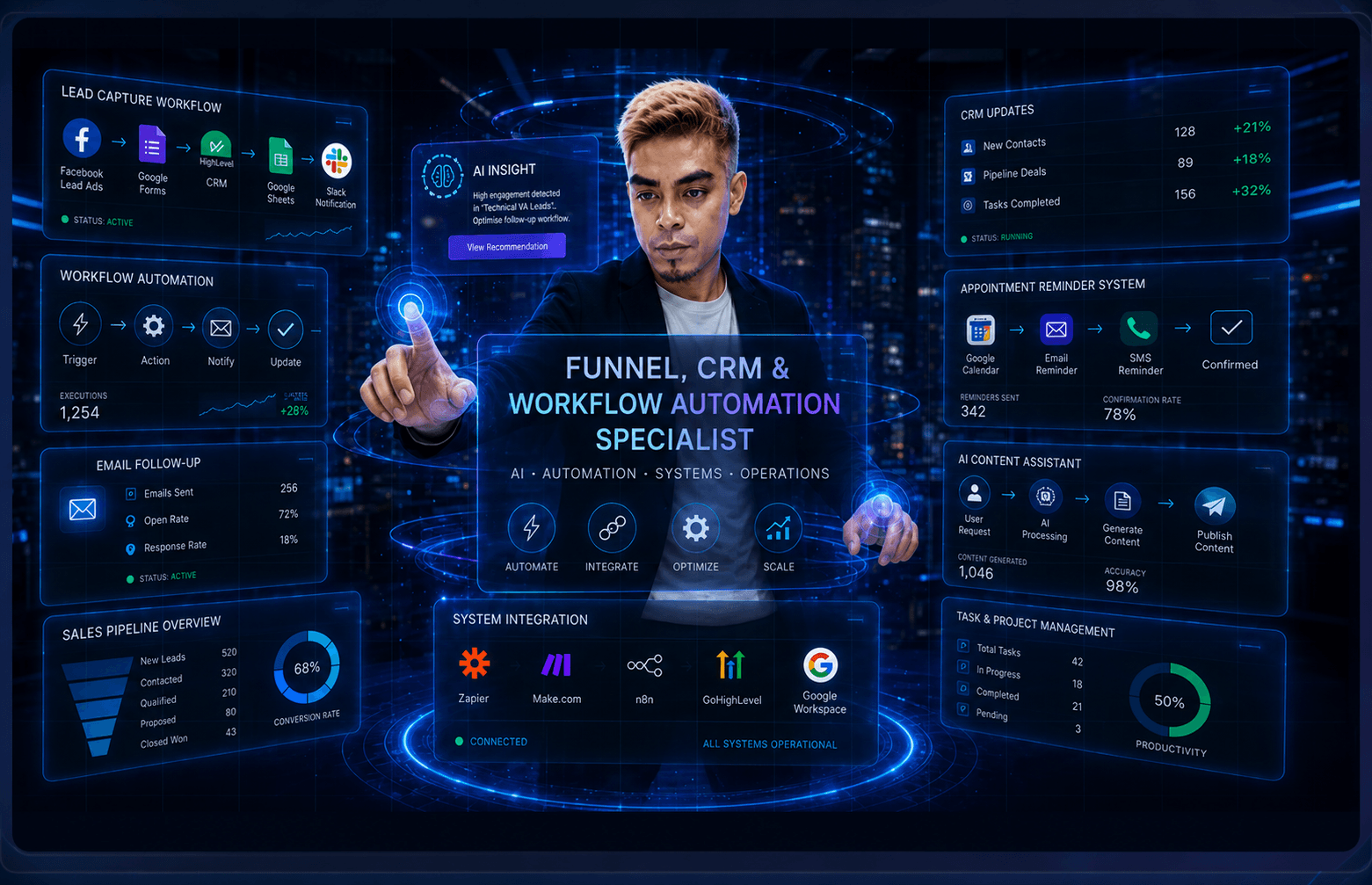
Edward Abule presenting funnel, CRM, and workflow automation systems

Funnels & Lead Generation

Landing pages, inquiry funnels, booking flows, and lead capture systems.

CRM & Customer Management

CRM setup, pipeline organization, contact tracking, tags, and follow-up systems.

Workflow Automation

Workflow setup, integrations, testing, troubleshooting, and documentation.

Core PlatformsZapierMake.comn8nGoHighLevelSysteme.ioManyChatGoogle Workspace

Services

Services I Can Support

Client-focused support for CRM, digital operations, and workflow automation.

Funnels & Lead Generation

Build landing pages, booking funnels, inquiry funnels, enrollment flows, and lead capture systems.

CRM & Pipeline Setup

Organize contacts, opportunities, pipelines, tags, follow-ups, and customer records.

Workflow Automation

Connect business tools and automate repetitive tasks using GoHighLevel, Zapier, Make.com, n8n, ManyChat, and related platforms.

Additional Digital Operations Support
Google WorkspaceDocumentationData OrganizationContent OperationsAI-Assisted Tasks

Automation System in Motion

How I Turn Manual Tasks Into Automated Workflows

A practical process for connecting triggers, CRM updates, follow-ups, team alerts, testing, and documentation.

Capture the Trigger

Start from a form, booking, inquiry, spreadsheet row, CRM event, or content approval.

Route the Information

Send the right data to CRM, email, calendar, task boards, spreadsheets, or team channels.

Automate the Actions

Create follow-ups, reminders, tasks, notifications, pipeline updates, and organized records.

Test and Document

Check real scenarios, fix errors, and prepare handoff notes so the workflow is easy to maintain.

Active Workflow

Automation data path

Loop

Trigger to handoff

1

Trigger

Lead / Form Submitted

New inquiry enters the system.

2

CRM

CRM Updated

Contact and pipeline details sync.

3

Email

Email Follow-Up Sent

Confirmation or next step goes out.

4

Calendar / Task

Task / Calendar Created

Work is scheduled and assigned.

5

Team Alert

Team Notification Sent

Slack or team channel gets context.

6

Documentation

Workflow Tested & Documented

Checks and handoff notes are ready.

Trigger
Data Check
CRM Update
Follow-Up
Team Alert
Documentation

Actual Workflows

Featured Actual Workflows

Selected hands-on workflow automations that were built, configured, tested, and documented.

Business impact figures are illustrative estimates based on workflow scope and potential manual-task reduction. Actual results vary by business volume, tools, process, and implementation.

Concept + Actual BuildZapier

Customer Onboarding Automation — Zapier

Tested Zapier workflow for organizing client onboarding across forms, email, files, tasks, CRM, and team alerts.

ZapierGoogle FormsGmailGoogle DriveTrelloHubSpotSlack
Project Details
Companies That Need This
  • Service providers
  • Agencies
  • Consultants
  • Coaches
  • Teams onboarding multiple clients
Company Problem
  • New customer details can arrive across forms, inboxes, files, and team messages.
  • Manual onboarding steps can delay welcome emails, task setup, file organization, and CRM updates.
  • Teams may miss handoff steps when onboarding is not tracked in one repeatable workflow.
  • Scattered onboarding records make it harder to confirm what has been completed.
Estimated Business Impact
  • Estimated Time Saved Per Day: This workflow may save around 15-60 minutes per day by reducing manual welcome emails, file organization, CRM updates, task creation, and team notifications.
  • Estimated Time Saved Per Month: For businesses onboarding multiple clients, this automation may save approximately 5-40 hours per month, depending on client volume.
  • Total Estimated Time Saved: High-volume service providers or agencies may save 40+ hours per month when onboarding many new clients.
  • Potential Conversion / Revenue Opportunity: A smoother onboarding experience can help improve client satisfaction, reduce onboarding delays, and support better retention opportunities. Revenue impact may vary depending on service value, client volume, and delivery process.
Problem Solved
  • Tested Zapier workflow for organizing client onboarding across forms, email, files, tasks, CRM, and team alerts
  • Reduces repeated manual entry and follow-up work.
  • Keeps workflow records, alerts, and next steps easier to track.
  • Supports faster response and cleaner handoff between tools.
Workflow Process
  • Zapier -> Google Forms -> Gmail -> Google Drive -> Trello
Company Benefits
  • More consistent onboarding steps
  • Cleaner client handoff records
  • Reduced repetitive setup work
  • Faster team visibility
  • Better organized welcome and task workflow
Concept + Actual BuildZapier

Lead Form Automation — Zapier

Tested Zapier workflow that captures form leads, logs them in Sheets, sends an alert, and syncs HubSpot CRM.

ZapierGoogle FormsGoogle SheetsGmailHubSpot CRMLead Tracking
Project Details
Companies That Need This
  • Small businesses
  • Service providers
  • Operations teams
  • Marketing teams
  • Agencies with repeatable workflow tasks
Company Problem
  • Lead form submissions can sit in inboxes or spreadsheets before anyone follows up.
  • Manual copying between forms, sheets, CRM tools, and notifications can create delays.
  • Incomplete lead records make it harder to prioritize and track new opportunities.
  • Teams need a cleaner intake process for fast lead review and follow-up preparation.
Estimated Business Impact
  • Estimated Time Saved Per Day: This automation may save around 15-90 minutes per day by reducing manual lead copying, spreadsheet updates, CRM entry, and alert sending.
  • Estimated Time Saved Per Month: For businesses handling regular form submissions, this workflow may save approximately 4-50 hours per month, depending on lead volume.
  • Total Estimated Time Saved: Businesses with high lead volume may save 50+ hours per month by automating lead capture and follow-up preparation.
  • Potential Conversion / Revenue Opportunity: By improving response speed and reducing missed leads, this workflow may help increase conversion opportunities by approximately 5%-20%, depending on lead volume, offer value, response time, and sales process.
Problem Solved
  • Tested Zapier workflow that captures form leads, logs them in Sheets, sends an alert, and syncs HubSpot CRM
  • Reduces repeated manual entry and follow-up work.
  • Keeps workflow records, alerts, and next steps easier to track.
  • Supports faster response and cleaner handoff between tools.
Workflow Process
  • Zapier -> Google Forms -> Google Sheets -> Gmail -> HubSpot CRM
Company Benefits
  • Faster lead intake review
  • Cleaner spreadsheet and CRM records
  • Reduced manual copying
  • More consistent notifications
  • Easier follow-up preparation
Concept + Actual BuildZapier

CRM Contact Creation — Zapier

Tested Zapier workflow for lead processing, CRM sync, Airtable/Sheets storage, and Slack team alerts.

ZapierGoogle FormsGoHighLevelHubSpotAirtableGoogle SheetsSlack
Project Details
Companies That Need This
  • Small businesses
  • Service providers
  • Operations teams
  • Marketing teams
  • Agencies with repeatable workflow tasks
Company Problem
  • New contacts can be entered manually across separate systems.
  • Duplicate or delayed CRM updates can make customer records harder to trust.
  • Sales or support teams may not have the latest contact details when they need them.
  • Manual CRM upkeep can consume time that should go toward follow-up.
Estimated Business Impact
  • Estimated Time Saved Per Day: This workflow may save around 20-120 minutes per day by reducing manual CRM contact creation, data syncing, and record updates.
  • Estimated Time Saved Per Month: For businesses handling many new contacts, this automation may save approximately 8-60 hours per month, depending on contact volume.
  • Total Estimated Time Saved: High-volume sales or service teams may save 60+ hours per month by automating contact creation and CRM syncing.
  • Potential Conversion / Revenue Opportunity: Organized CRM records can help teams follow up faster and avoid missed opportunities. This may help improve conversion opportunities by approximately 5%-15%, depending on lead quality, offer value, and sales process.
Problem Solved
  • Tested Zapier workflow for lead processing, CRM sync, Airtable/Sheets storage, and Slack team alerts
  • Reduces repeated manual entry and follow-up work.
  • Keeps workflow records, alerts, and next steps easier to track.
  • Supports faster response and cleaner handoff between tools.
Workflow Process
  • Zapier -> Google Forms -> GoHighLevel -> HubSpot -> Airtable
Company Benefits
  • More reliable CRM contact records
  • Reduced duplicate manual entry
  • Cleaner cross-tool contact syncing
  • Faster team access to lead information
  • Better follow-up organization
Concept + Actual BuildGoHighLevel

Appointment Reminder Automation — GoHighLevel

Tested GoHighLevel workflow for confirmations, timed reminders, wait steps, and staff notification.

GoHighLevelAppointmentsEmailWait StepsStaff NotificationCalendar
Project Details
Companies That Need This
  • Clinics
  • Salons
  • Coaches
  • Consultants
  • Appointment-based service providers
Company Problem
  • Manual appointment confirmations can be inconsistent.
  • Staff may spend time sending reminder messages one by one.
  • Missed reminders can contribute to confusing appointment communication.
  • Booking teams need a clearer process for confirmations, reminders, and internal alerts.
Estimated Business Impact
  • Estimated Time Saved Per Day: This automation may save around 15-90 minutes per day by reducing manual appointment confirmations, reminder messages, and staff notifications.
  • Estimated Time Saved Per Month: For appointment-based businesses, this workflow may save approximately 4-40 hours per month, depending on appointment volume.
  • Total Estimated Time Saved: Busy clinics, salons, coaches, or service providers may save 40+ hours per month by automating reminders and staff updates.
  • Potential Conversion / Revenue Opportunity: Automated reminders can help reduce missed appointments and improve client communication. This may support better revenue protection by helping reduce no-shows, depending on appointment volume and booking value.
Problem Solved
  • Tested GoHighLevel workflow for confirmations, timed reminders, wait steps, and staff notification
  • Reduces repeated manual entry and follow-up work.
  • Keeps workflow records, alerts, and next steps easier to track.
  • Supports faster response and cleaner handoff between tools.
Workflow Process
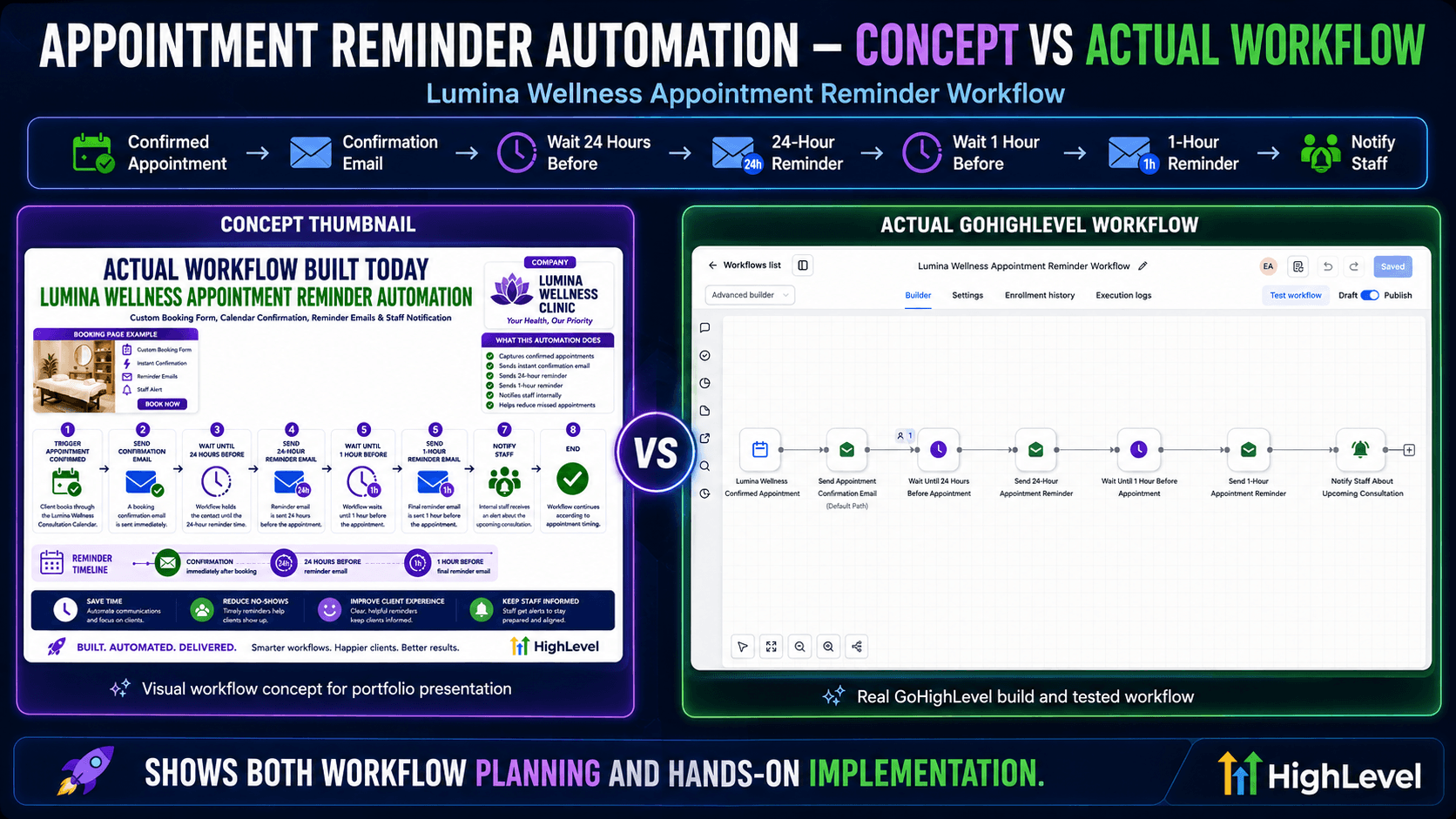
  • GoHighLevel -> Appointments -> Email -> Wait Steps -> Staff Notification
Company Benefits
  • More consistent appointment communication
  • Reduced repetitive manual reminder work
  • Clearer follow-up process
  • Better organized booking operations
  • Faster staff awareness for appointment activity
Concept + Actual BuildGoHighLevel

Lead Capture & CRM Setup — GoHighLevel

Tested GoHighLevel workflow for form capture, CRM updates, opportunities, follow-ups, tasks, and team notification.

GoHighLevelCRMFormsOpportunitiesEmailSMSTasks
Project Details
Companies That Need This
  • Local businesses
  • Service providers
  • Coaches
  • Consultants
  • Teams using GoHighLevel CRM workflows
Company Problem
  • Lead inquiries can arrive without being added cleanly to the CRM pipeline.
  • Manual tagging, opportunity creation, and follow-up tasks can be easy to miss.
  • Teams may not receive a clear alert when a new lead enters the system.
  • Businesses need a more organized path from inquiry capture to sales follow-up.
Estimated Business Impact
  • Estimated Time Saved Per Day: This workflow may save around 30-120 minutes per day by reducing manual CRM updates, opportunity creation, follow-ups, task creation, and team notifications.
  • Estimated Time Saved Per Month: For businesses receiving consistent leads, this automation may save approximately 8-60 hours per month, depending on lead volume.
  • Total Estimated Time Saved: High-volume businesses may save 60+ hours per month by automating lead capture, CRM organization, and follow-up tasks.
  • Potential Conversion / Revenue Opportunity: By improving speed-to-lead, CRM organization, and follow-up consistency, this workflow may help increase conversion opportunities by approximately 5%-20%, depending on lead volume, offer value, response time, and sales process.
Problem Solved
  • Tested GoHighLevel workflow for form capture, CRM updates, opportunities, follow-ups, tasks, and team notification
  • Reduces repeated manual entry and follow-up work.
  • Keeps workflow records, alerts, and next steps easier to track.
  • Supports faster response and cleaner handoff between tools.
Workflow Process
  • GoHighLevel -> CRM -> Forms -> Opportunities -> Email
Company Benefits
  • Centralized inquiry capture
  • Cleaner CRM pipeline setup
  • More consistent lead tagging
  • Faster new-lead team alerts
  • Easier sales follow-up tracking
Concept + Actual BuildGoHighLevel

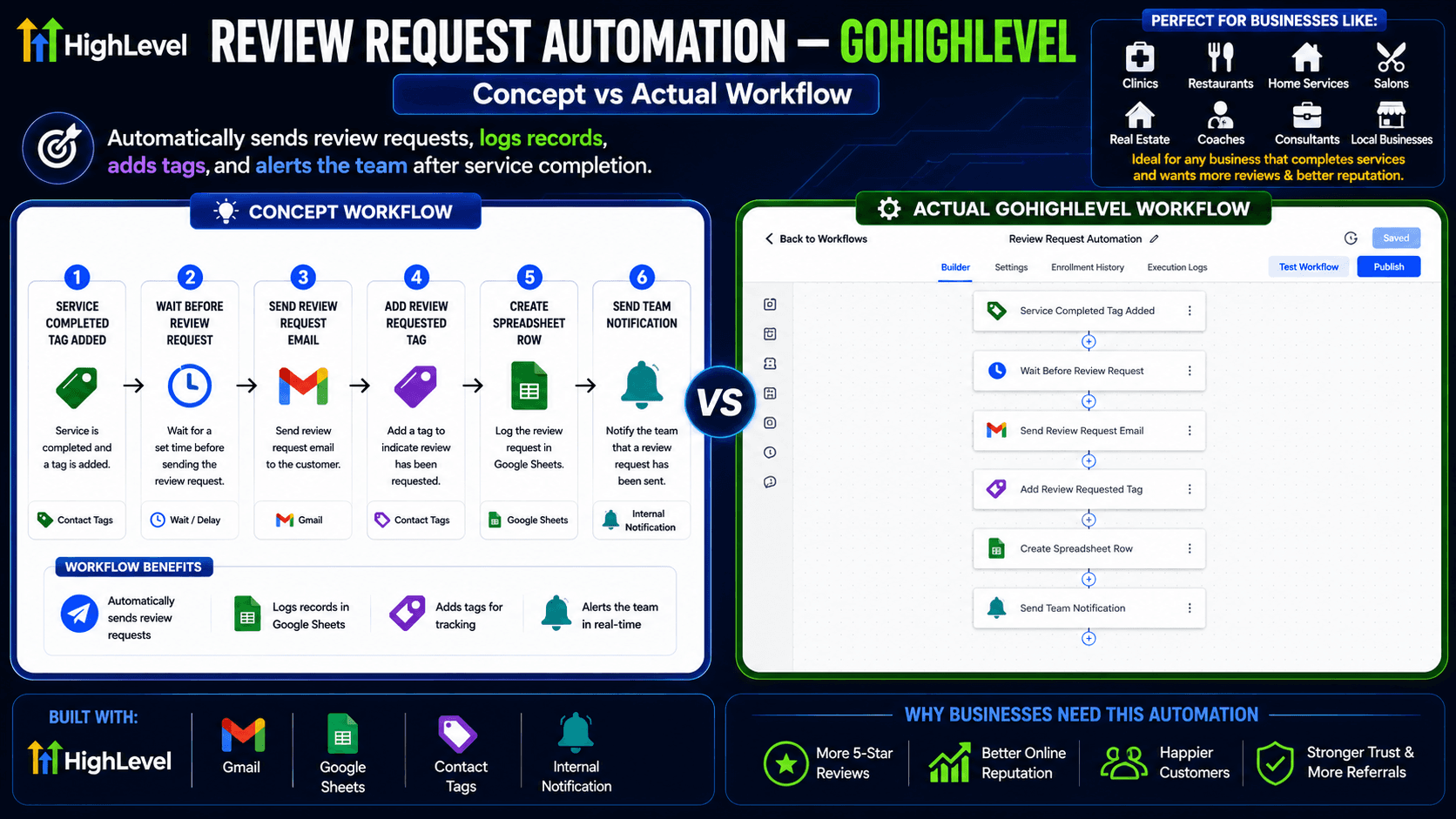
Review Request Automation — GoHighLevel

GoHighLevel workflow that sends review requests, logs records in Google Sheets, adds tracking tags, and alerts the team after service completion.

GoHighLevelGmailGoogle SheetsContact TagsReview RequestInternal NotificationReputation Management
Project Details
Companies That Need This
  • Local businesses
  • Service providers
  • Coaches
  • Consultants
  • Teams using GoHighLevel CRM workflows
Company Problem
  • Staff may forget to request reviews after service completion.
  • Review outreach can be inconsistent or difficult to track.
  • Businesses may lack a clear tag or record showing that a review request was sent.
  • Teams need a repeatable reputation-management workflow after completed services.
Estimated Business Impact
  • Estimated Time Saved Per Day: This automation may save around 10-60 minutes per day by reducing manual review request messages, tracking, tagging, and team notifications.
  • Estimated Time Saved Per Month: For businesses serving regular customers, this workflow may save approximately 4-30 hours per month, depending on customer volume.
  • Total Estimated Time Saved: High-volume local businesses may save 30+ hours per month by automating review requests and tracking.
  • Potential Conversion / Revenue Opportunity: More consistent review requests can help strengthen online reputation and social proof. This may support better trust and conversion opportunities, depending on customer satisfaction, review response rate, and local competition.
Problem Solved
  • GoHighLevel workflow that sends review requests, logs records in Google Sheets, adds tracking tags, and alerts the team after service completion
  • Reduces repeated manual entry and follow-up work.
  • Keeps workflow records, alerts, and next steps easier to track.
  • Supports faster response and cleaner handoff between tools.
Workflow Process
  • Service Completed Tag Added → Wait Before Review Request → Send Review Request Email → Add Review Requested Tag → Create Spreadsheet Row → Send Team Notification.
Company Benefits
  • More consistent review requests
  • Better follow-up tracking
  • Reduced manual outreach
  • More organized reputation-management workflow
  • Clearer team notification after service completion
Concept + Actual BuildGoHighLevel

Course / Training Inquiry Automation — GoHighLevel

A GoHighLevel workflow that automatically responds to course inquiries, sends course details, pricing and payment information, follow-up reminders, final enrollment reminders, and owner notifications.

GoHighLevelCourse InquiryTraining AutomationEnrollment Follow-UpLead NurturingStudent InquiryOwner Notification
Project Details
Companies That Need This
  • Online course creators
  • Training centers
  • Coaches
  • VA academies
  • Small schools
Company Problem
  • Course inquiries can require repeated manual replies about details, pricing, payment, and enrollment.
  • Interested students may not receive timely follow-up reminders.
  • Training providers may not have one clear record of inquiry status and owner notifications.
  • Manual enrollment follow-up can become hard to manage when inquiries increase.
Estimated Business Impact
  • Estimated Time Saved Per Day: This workflow may save around 15-90 minutes per day by reducing manual replies to course inquiries, pricing messages, payment information, reminders, and owner notifications.
  • Estimated Time Saved Per Month: For course creators and training providers, this automation may save approximately 4-40 hours per month, depending on inquiry volume.
  • Total Estimated Time Saved: Training providers with high inquiry volume may save 40+ hours per month by automating student inquiry replies and follow-ups.
  • Potential Conversion / Revenue Opportunity: By responding faster and following up consistently with interested students, this workflow may help increase enrollment opportunities by approximately 5%-20%, depending on inquiry volume, course offer, pricing, and follow-up process.
Problem Solved
  • A GoHighLevel workflow that automatically responds to course inquiries, sends course details, pricing and payment information, follow-up reminders, final enrollment reminders, and owner notifications
  • Reduces repeated manual entry and follow-up work.
  • Keeps workflow records, alerts, and next steps easier to track.
  • Supports faster response and cleaner handoff between tools.
Workflow Process
  • Course Inquiry → Send Course Details → Send Pricing and Payment Info → Wait 1 Day → Send Follow-Up Reminder → Wait 2 Days → Send Final Enrollment Reminder → Notify Owner.
Company Benefits
  • Faster responses to student inquiries
  • More consistent pricing and payment information
  • Clearer enrollment follow-up reminders
  • Reduced repeated inquiry replies
  • Better owner visibility on interested students
Concept + Actual BuildGoHighLevel

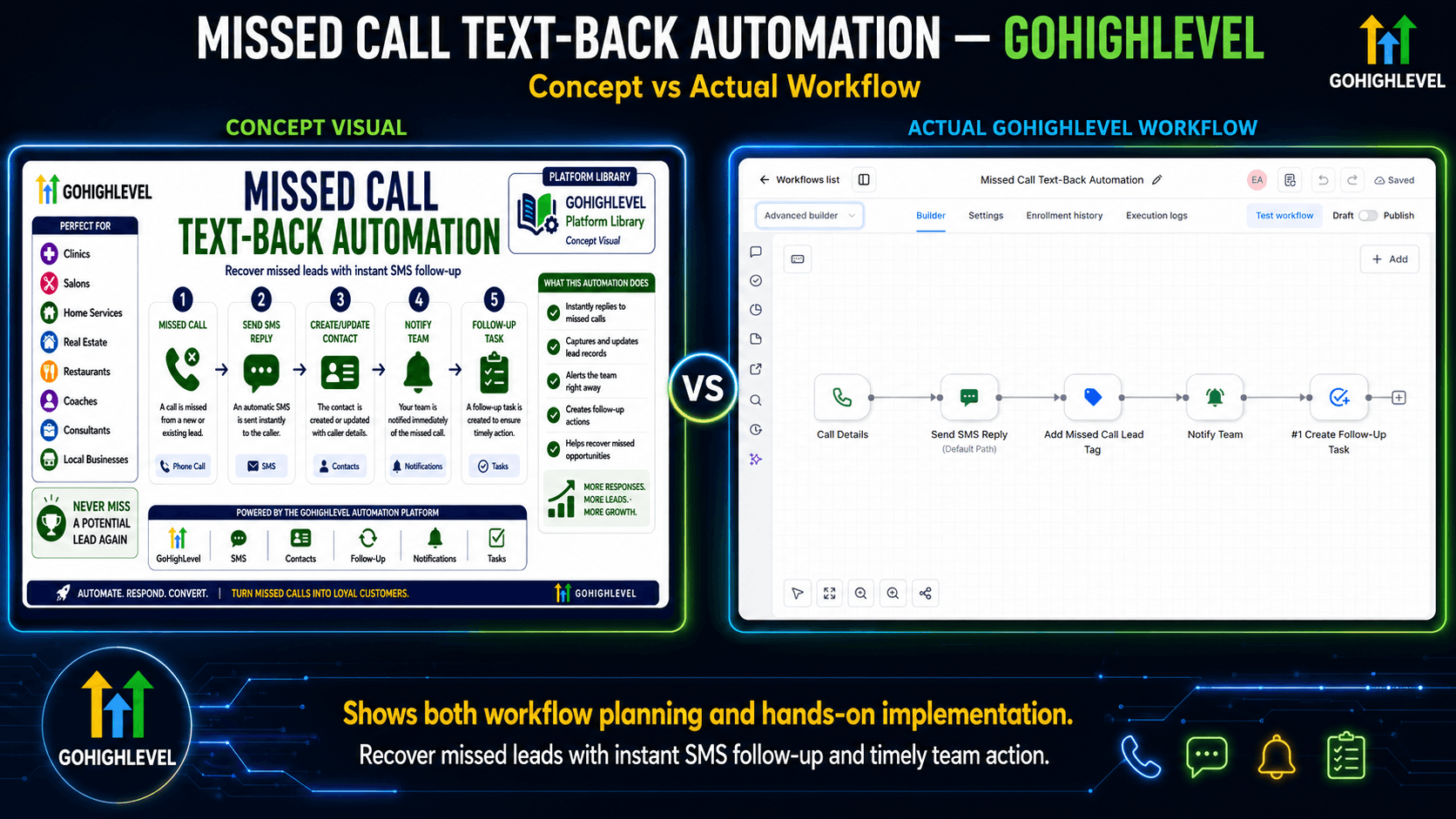
Missed Call Text-Back Automation — GoHighLevel

A GoHighLevel workflow that automatically responds to missed calls, sends an SMS reply, adds a missed call lead tag, notifies the team, and creates a follow-up task.

GoHighLevelMissed CallSMS ReplyLead RecoveryContact TagTeam NotificationFollow-Up Task
Project Details
Companies That Need This
  • Clinics
  • Salons
  • Home service businesses
  • Real estate teams
  • Local businesses receiving missed calls
Company Problem
  • Missed calls can turn into missed leads when no one responds quickly.
  • Manual call checking and text replies can be inconsistent during busy hours.
  • Teams may not know which missed calls need follow-up.
  • Local businesses need a faster path from missed call to reply, tag, team alert, and follow-up task.
Estimated Business Impact
  • Estimated Time Saved Per Day: This automation may save around 10-60 minutes per day by reducing manual missed call checking, SMS replies, tagging, team alerts, and follow-up task creation.
  • Estimated Time Saved Per Month: For local businesses receiving regular missed calls, this workflow may save approximately 4-30 hours per month, depending on missed call volume.
  • Total Estimated Time Saved: Busy local businesses may save 30+ hours per month by automating missed call recovery and follow-up tasks.
  • Potential Conversion / Revenue Opportunity: Fast missed-call text-back can help recover leads that may otherwise contact competitors. This may help improve lead recovery and conversion opportunities by approximately 5%-20%, depending on call volume, response speed, and offer value.
Problem Solved
  • A GoHighLevel workflow that automatically responds to missed calls, sends an SMS reply, adds a missed call lead tag, notifies the team, and creates a follow-up task
  • Reduces repeated manual entry and follow-up work.
  • Keeps workflow records, alerts, and next steps easier to track.
  • Supports faster response and cleaner handoff between tools.
Workflow Process
  • Call Details → Send SMS Reply → Add Missed Call Lead Tag → Notify Team → Create Follow-Up Task.
Company Benefits
  • Faster reply to missed callers
  • More organized missed-call lead tracking
  • Reduced manual call follow-up checks
  • Clearer team notification process
  • More consistent follow-up task creation
Concept + Actual BuildZapier

Social Media Content Workflow Automation — Zapier

Tested Zapier workflow that moves approved content through tracking, scheduling, alerts, and publishing preparation.

ZapierTrelloGoogle SheetsNotionGoogle CalendarGmailSlackContent Workflow
Project Details
Companies That Need This
  • Marketing teams
  • Content agencies
  • Social media managers
  • Creators
  • Teams publishing content regularly
Company Problem
  • Content approvals, publishing notes, schedules, and team updates can become scattered.
  • Manual movement between planning boards, calendars, spreadsheets, and notifications can slow publishing.
  • Teams may lose visibility on which content is ready, scheduled, or waiting for review.
  • A repeatable content workflow helps reduce confusion around next steps.
Estimated Business Impact
  • Estimated Time Saved Per Day: This workflow may save around 30-120 minutes per day by reducing manual content tracking, scheduling, calendar updates, email notifications, Slack alerts, and Trello movement.
  • Estimated Time Saved Per Month: For teams publishing content regularly, this automation may save approximately 8-50 hours per month, depending on content volume.
  • Total Estimated Time Saved: Busy content teams or agencies may save 50+ hours per month by automating approval, scheduling, and team notification steps.
  • Potential Conversion / Revenue Opportunity: A more consistent content workflow can help improve publishing consistency, team coordination, and campaign execution. Revenue impact may vary depending on content strategy, audience quality, and offer value.
Problem Solved
  • Tested Zapier workflow that moves approved content through tracking, scheduling, alerts, and publishing preparation
  • Reduces repeated manual entry and follow-up work.
  • Keeps workflow records, alerts, and next steps easier to track.
  • Supports faster response and cleaner handoff between tools.
Workflow Process
  • Zapier -> Trello -> Google Sheets -> Notion -> Google Calendar
Company Benefits
  • Clearer content approval flow
  • Better publishing schedule visibility
  • Reduced manual status updates
  • More consistent team notifications
  • Easier campaign coordination
Concept + Actual BuildMake.com

Customer Support Ticket Routing Automation — Make.com

Tested Make.com workflow that routes support requests by priority, sends team alerts, creates Trello cards, sends email responses, and updates tracking records.

Make.comGoogle SheetsRouterSlackTrelloGmailTicket RoutingCustomer SupportTeam Alert
Project Details
Companies That Need This
  • Customer support teams
  • Service businesses
  • Operations teams
  • Agencies
  • Companies handling recurring support requests
Company Problem
  • Support requests can arrive without clear priority or ownership.
  • Manual ticket sorting can delay team alerts, task creation, email responses, and tracking updates.
  • Teams may lose visibility when requests are managed across separate tools.
  • Support operations need a cleaner routing process for priority, alerts, cards, replies, and records.
Estimated Business Impact
  • Estimated Time Saved Per Day: This automation may save around 30-180 minutes per day by reducing manual ticket checking, priority sorting, Slack alerts, Trello card creation, email replies, and tracking updates.
  • Estimated Time Saved Per Month: For support teams handling regular requests, this workflow may save approximately 8-80 hours per month, depending on ticket volume.
  • Total Estimated Time Saved: High-volume support teams may save 80+ hours per month by automating ticket routing and response preparation.
  • Potential Conversion / Revenue Opportunity: Faster ticket routing can help improve customer experience, response time, and retention opportunities. Revenue impact may vary depending on customer volume, support quality, and service value.
Problem Solved
  • Tested Make.com workflow that routes support requests by priority, sends team alerts, creates Trello cards, sends email responses, and updates tracking records
  • Reduces repeated manual entry and follow-up work.
  • Keeps workflow records, alerts, and next steps easier to track.
  • Supports faster response and cleaner handoff between tools.
Workflow Process
  • Google Sheets → Router → Slack → Trello → Gmail → Google Sheets.
Company Benefits
  • Cleaner priority-based ticket routing
  • Faster team awareness of support requests
  • Reduced manual Trello card creation
  • More consistent email response preparation
  • Better support tracking records
Concept + Actual Buildn8n

AI Content Assistant Workflow Automation — n8n

Tested n8n workflow that collects content requests, generates AI-assisted content drafts, saves outputs to Google Sheets, and sends Gmail notifications for review.

n8nAI WorkflowContent AutomationGoogle SheetsGmailOpenAIOpenRouterContent RequestAI Drafting
Project Details
Companies That Need This
  • Content creators
  • Marketing teams
  • Agencies
  • Small businesses
  • Teams creating AI-assisted content regularly
Company Problem
  • Content requests can lack a clear intake, drafting, review, and notification process.
  • Manual AI drafting and record keeping can be inconsistent across topics and channels.
  • Teams may struggle to track which drafts were generated, saved, and sent for review.
  • A structured workflow helps connect content requests, AI-assisted drafting, Sheets records, and Gmail notifications.
Estimated Business Impact
  • Estimated Time Saved Per Day: This workflow may save around 30-180 minutes per day by reducing manual content idea preparation, drafting, saving outputs, and sending review notifications.
  • Estimated Time Saved Per Month: For businesses creating content regularly, this automation may save approximately 10-100+ hours per month, depending on content volume.
  • Total Estimated Time Saved: High-volume creators, agencies, or marketing teams may save 100+ hours per month by automating AI-assisted content drafting and review preparation.
  • Potential Conversion / Revenue Opportunity: Faster content production can help improve marketing consistency and audience engagement. Revenue impact may vary depending on content quality, audience size, offer value, and conversion strategy.
Problem Solved
  • Tested n8n workflow that collects content requests, generates AI-assisted content drafts, saves outputs to Google Sheets, and sends Gmail notifications for review
  • Reduces repeated manual entry and follow-up work.
  • Keeps workflow records, alerts, and next steps easier to track.
  • Supports faster response and cleaner handoff between tools.
Workflow Process
  • n8n -> AI Workflow -> Content Automation -> Google Sheets -> Gmail
Company Benefits
  • Cleaner content request intake
  • More structured AI-assisted draft creation
  • Better Google Sheets output tracking
  • More consistent Gmail review notifications
  • Reduced manual draft handoff work

GoHighLevel Funnel Systems

GOHIGHLEVEL FUNNEL PROJECTS

Client-ready GoHighLevel funnel systems built with conversion-focused pages, lead capture forms, CRM integration, sales pipelines, and automated follow-up.

Client-Ready Demo BuildGoHighLevel Funnel + CRM

GoHighLevel Lead Generation Funnel & CRM Automation

Built a complete GoHighLevel lead generation funnel that captures prospect inquiries, creates organized CRM contacts, applies lead tags, generates pipeline opportunities, sends personalized confirmation emails, notifies the team, and redirects visitors to a branded Thank You page. The system is connected to a live custom subdomain and was successfully tested from form submission through final workflow execution.

Starting at $45

GoHighLevelLive FunnelCRM AutomationFully TestedCustom DomainLead Capture FormSales PipelineInternal Notification
Project Details
Companies That Need This
  • Marketing agencies
  • Consulting businesses
  • Coaching businesses
  • Real estate teams
  • Home-service companies
  • Professional service providers
  • Online course businesses
  • Local service businesses
  • Small sales teams
  • Businesses running paid advertisements
  • Businesses receiving website inquiries
  • Businesses needing organized CRM follow-up
Company Problem
  • Businesses may receive inquiries through websites, paid ads, social media, and forms without one organized lead-management system.
  • Manual lead handling can cause slow responses and repetitive data entry.
  • Contact and service information may be incomplete or scattered.
  • New opportunities may not be created consistently.
  • Leads may not receive immediate confirmation.
  • Team members may miss important new-lead notifications.
  • Unclear pipeline status can delay follow-up.
  • Inconsistent lead management may create a poor customer experience.
Estimated Business Impact
  • Estimated Time Saved Per Day: Approximately 5-10 minutes of manual contact entry, tagging, email confirmation, pipeline creation, and team notification may be saved per lead.
  • Estimated Time Saved Per Month: Actual savings depend on lead volume. For example, 100 inquiries could potentially reduce approximately 8-16 hours of repetitive administrative work.
  • Total Estimated Time Saved: The total time saved depends on inquiry volume, the sales process, and how much of the follow-up work is handled manually today.
  • Potential Conversion / Revenue Opportunity: Faster confirmation and organized follow-up may help a business respond before prospects lose interest. Results still depend on the offer, traffic quality, sales process, response speed, pricing, and other business factors.
Problem Solved
  • Centralizes prospect inquiries in GoHighLevel CRM.
  • Reduces repetitive contact entry and tagging.
  • Organizes service interest and project details.
  • Creates new sales opportunities consistently.
  • Sends immediate confirmation to new leads.
  • Alerts the business team when a lead arrives.
  • Places new opportunities in a trackable sales pipeline.
  • Provides a professional branded confirmation journey.
  • Helps reduce missed inquiries and inconsistent follow-up.
Workflow Process
  • Visitor opens the live landing page -> Clicks Request a Free Consultation -> Completes the Universal Lead Capture Form -> Contact is created or updated in GoHighLevel CRM -> New Lead tag is applied -> Opportunity is created in the Lead Generation Sales Pipeline -> Personalized confirmation email is sent -> Business team receives a new-lead notification -> Visitor is redirected to the branded Thank You page -> Lead is ready for follow-up and pipeline management.
Actual Automation Details
  • Trigger: Universal Lead Capture Form is submitted.
  • Workflow sequence: Form Submitted -> Add New Lead Tag -> Create New Opportunity -> Send Lead Confirmation Email -> Notify Team of New Lead -> End of Workflow.
  • Pipeline: Lead Generation Sales Pipeline.
  • Initial pipeline stage: New Lead.
  • Captured information: first name, last name, email, phone number, service interested, project details, and time-zone information where enabled.
Company Benefits
  • Faster response to prospect inquiries
  • Centralized lead information
  • Reduced manual data entry
  • Better lead organization
  • Consistent prospect communication
  • Immediate lead confirmation
  • Clear sales-pipeline visibility
  • Faster team awareness
  • Fewer overlooked opportunities
  • More professional customer experience
  • Easier follow-up management
  • More scalable lead-handling process
Testing and Validation
  • Custom GoHighLevel subdomain connected successfully.
  • Landing page published.
  • Thank You page published.
  • Mobile page view checked.
  • Form submission completed successfully.
  • Thank You page redirect verified.
  • CRM contact creation verified.
  • New Lead tag verified.
  • Pipeline opportunity verified.
  • Opportunity placed under the New Lead stage.
  • Confirmation email delivery verified.
  • Internal team notification verified.
  • Workflow execution completed successfully.
  • Final execution reached End of Workflow.
  • The final test used demo contact data.
Live Project Links
BUILT & PUBLISHEDGOHIGHLEVEL FUNNEL

Dental Appointment Booking Funnel & Automation

A complete GoHighLevel appointment booking funnel with a responsive landing page, online booking calendar, confirmation page, confirmation email, staff notification, and scheduled 24-hour and 2-hour SMS reminder steps.

Starting at $45

GoHighLevelAppointment FunnelBooking CalendarDental ClinicConfirmation EmailStaff NotificationSMS RemindersWorkflow AutomationResponsive FunnelCRM SupportClient-Ready Demo
Project Details
Companies That Need This
  • Dental clinics
  • Medical and wellness clinics
  • Salons and spas
  • Consultants
  • Coaches
  • Home-service providers
  • Professional service businesses
  • Other appointment-based businesses
Company Problem
  • Manual appointment scheduling can require repeated calls or messages.
  • Customers may wait for booking confirmation.
  • Staff may not immediately know when a new appointment is booked.
  • Manual reminders consume administrative time.
  • Customers may forget scheduled appointments.
  • Appointment information may be scattered across different messages or tools.
  • Inconsistent reminders may contribute to missed appointments.
  • Businesses need one connected system for booking, confirmation, notification, and follow-up.
Estimated Business Impact
  • Estimated Time Saved Per Appointment: Approximately 5-10 minutes of manual appointment coordination, confirmation, staff notification, and reminder preparation may be reduced.
  • Estimated Time Saved Per Month: Actual savings depend on appointment volume. For example, 100 appointments could potentially reduce approximately 8-16 hours of repetitive administrative work.
  • Potential Appointment Opportunity: A convenient booking experience and timely reminders may help a business respond more consistently and reduce forgotten appointments. Actual results depend on customer behavior, schedule availability, message delivery, business operations, and follow-up practices.
Problem Solved
  • This funnel connects the customer booking journey and the internal appointment workflow in one GoHighLevel system. Visitors can review the offer, select an available schedule, complete their booking, receive confirmation, and enter a scheduled reminder sequence, while staff receive timely appointment notifications.
Funnel and Workflow Process
  • Visitor opens the BrightCare Dental landing page
  • Reviews the appointment offer
  • Clicks Book an Appointment
  • Opens the booking calendar
  • Selects an available date and time
  • Enters the required booking information
  • Submits the appointment
  • Appointment is recorded in GoHighLevel
  • Visitor sees the confirmation page
  • Confirmation email is sent
  • Clinic staff receives a notification
  • Workflow waits until 24 hours before the appointment
  • 24-hour SMS reminder is scheduled
  • Workflow waits until 2 hours before the appointment
  • 2-hour SMS reminder is scheduled
Actual Automation Details
  • Workflow name: BrightCare Dental Appointment Booking Automation.
  • Correct trigger: Appointment Booked.
  • Workflow sequence: Appointment Booked -> Send Confirmation Email -> Notify Staff of New Appointment -> Wait Until 24 Hours Before Appointment -> Send 24-Hour Reminder (SMS) -> Wait Until 2 Hours Before Appointment -> Send 2-Hour Reminder (SMS).
  • 1. Appointment Booked
  • 2. Send Confirmation Email
  • 3. Notify Staff of New Appointment
  • 4. Wait Until 24 Hours Before Appointment
  • 5. Send 24-Hour Reminder (SMS)
  • 6. Wait Until 2 Hours Before Appointment
  • 7. Send 2-Hour Reminder (SMS)
Company Benefits
  • Convenient online appointment booking
  • Immediate booking confirmation
  • Faster staff awareness
  • Reduced repetitive administrative work
  • Consistent reminder scheduling
  • Better-organized appointment information
  • Professional customer journey
  • Less reliance on manual reminder messages
  • Easier scheduling for customers and staff
Testing and Validation
  • Verified: Landing page built.
  • Verified: Booking calendar connected.
  • Verified: Appointment date and time selection tested.
  • Verified: Confirmation page displayed.
  • Verified: Appointment workflow published.
  • Verified: Workflow enrollment verified.
  • Verified: Confirmation email action executed.
  • Verified: Staff-notification action executed.
  • Verified: Execution logs reviewed.
  • Verified: Workflow entered the 24-hour wait step.
  • Verified: 24-hour SMS reminder configured.
  • Verified: 2-hour wait step configured.
  • Verified: 2-hour SMS reminder configured.
  • Reminder steps configured and scheduled according to appointment timing.
  • The available execution logs verify the immediate booking actions and entry into the scheduled wait period. The future 24-hour and 2-hour SMS reminders were configured and scheduled according to appointment timing, but later delivery must not be claimed unless explicit delivery logs are available.
Live Project Links
BUILT, PUBLISHED & TESTEDGOHIGHLEVEL FUNNEL

GoHighLevel Strategy Call Funnel & Sales Automation

A complete GoHighLevel strategy-call acquisition and follow-up system connecting a VSL landing page, lead qualification survey, booking calendar, CRM pipeline, reminder automation, cancellation protection, no-show recovery, and post-call sales follow-up.

Starting at $99

GoHighLevelFunnel BuildingLead QualificationCRM AutomationSales PipelineNo-Show RecoverySales Follow-UpSales Automation System
Project Details
Companies That Need This
  • Consultants
  • Coaches
  • Agencies
  • Professional service businesses
  • Appointment-based businesses
  • High-ticket service providers
  • Sales teams using consultation or strategy calls
  • Businesses that qualify prospects before sales calls
  • Businesses that need structured post-call follow-up
Company Problem
  • Businesses that sell through strategy or consultation calls can lose efficiency when lead qualification, booking, CRM updates, reminders, cancellations, no-shows, and post-call follow-up are handled through separate manual processes.
  • Unqualified prospects booking calls
  • Lead information scattered across tools
  • Manual CRM opportunity creation
  • Inconsistent booking confirmations
  • Missed appointment reminders
  • Weak cancellation handling
  • No structured no-show recovery
  • Poor sales-pipeline visibility
  • Inconsistent post-call sales follow-up
  • Repetitive administrative work between qualification, booking, and follow-up
Estimated Business Impact
  • Potential Operational Impact:
  • Reduces repetitive manual follow-up tasks
  • Supports more consistent strategy-call scheduling
  • Creates a structured lead-qualification process
  • Improves CRM and pipeline visibility
  • Reduces manual opportunity-management work
  • Creates a repeatable cancellation-handling process
  • Creates structured no-show recovery
  • Supports more consistent post-call sales follow-up
  • Creates a cleaner handoff from lead qualification to booking
  • Centralizes the strategy-call journey inside GoHighLevel
  • Business impact is based on workflow scope and potential manual-task reduction. Actual results vary by business volume, offer, audience, sales process, implementation, and follow-up practices.
Problem Solved
  • This system brings the strategy-call customer journey into one connected GoHighLevel environment. Prospects move from the VSL landing page to qualification, booking, CRM opportunity management, reminders, cancellation/no-show handling, and post-call follow-up through structured funnel pages, pipeline stages, and automation workflows.
Workflow Process
  • VSL Landing Page -> Lead Qualification Survey -> Strategy Call Booking Page -> GoHighLevel Contact / CRM -> Opportunity Created in Sales Pipeline -> Booking Confirmation -> Reminder Sequence -> Cancellation Protection if Cancelled -> No-Show Recovery if Missed -> Strategy Call Showed -> Post-Call Thank-You -> Sales Follow-Up Sequence -> Follow-Up Needed / Sales Pipeline Stage
  • Actual funnel structure: VSL Landing Page, Lead Qualification Survey, and Strategy Call Booking Page.
  • Calendar: Elevate Growth Strategy Call Calendar.
  • Calendar configuration includes 30-minute strategy calls, weekday availability, minimum scheduling notice, pre-buffer, post-buffer, daily booking limits, confirmation page, email/reminder settings, reschedule support, and cancellation support.
  • Pipeline: Elevate Growth Strategy Call Sales Pipeline.
  • Pipeline stages: New Qualified Lead -> Strategy Call Booked -> Strategy Call Showed -> Follow-Up Needed -> No Show -> Closed Won -> Closed Lost.
Actual Automation Details
  • Full project identity: GoHighLevel Strategy Call Funnel + CRM + Sales Automation System.
  • Demo business/system name: Elevate Growth.
  • Project type: client-ready demo project, portfolio build, tested GoHighLevel system, and published Upwork Project Catalog service.
  • Workflow 1: Elevate Growth Strategy Call Booking & Reminder Automation.
  • Workflow 1 includes confirmed booking trigger, opportunity creation, booking confirmation, 1-week reminder, 3-day reminder, 1-day reminder, and 1-hour reminder.
  • Workflow 2: Elevate Growth Strategy Call Cancellation Protection.
  • Workflow 2 detects cancelled strategy calls, finds the related opportunity, marks cancelled opportunity as lost when found, removes contact from the booking/reminder workflow, and handles the opportunity-not-found path.
  • Workflow 3: Elevate Growth Strategy Call No-Show Recovery.
  • Workflow 3 identifies no-show strategy calls, finds or creates the opportunity, sends no-show recovery email, waits 24 hours, sends follow-up, waits 48 hours, sends final recovery email, moves unrecovered no-shows to Follow-Up Needed, and includes fallback logic.
  • Workflow 4: Elevate Growth Strategy Call Showed & Sales Follow-Up.
  • Workflow 4 identifies showed strategy calls, finds or creates the opportunity, moves opportunity to Strategy Call Showed, sends post-call thank-you email, waits 24 hours, sends sales follow-up email, waits 48 hours, sends final sales follow-up, moves contact/opportunity to Follow-Up Needed, and includes fallback logic.
Company Benefits
  • More organized lead qualification
  • Cleaner strategy-call booking process
  • Centralized CRM opportunity management
  • More consistent reminder scheduling
  • Structured cancellation handling
  • Repeatable no-show recovery
  • More consistent post-call sales follow-up
  • Better pipeline visibility
  • Reduced repetitive manual follow-up work
  • One connected GoHighLevel sales process
Testing and Validation
  • Verified Project Proof:
  • Normal workflow paths executed successfully
  • Fallback workflow paths executed successfully
  • Opportunity creation and movement verified
  • Email actions executed
  • Wait steps triggered correctly
  • Workflow enrollment logs reviewed
  • Execution logs reviewed
  • Workflows published
  • Funnel pages live
  • Custom domain working
  • Booking, cancellation, no-show, and showed-call logic tested
  • This portfolio project demonstrates tested system behavior and workflow execution. It does not contain verified real-client conversion, revenue, ROI, lead-volume, or sales-performance statistics.
Live Project Links

Fixed-Price & Project-Based Services

Done-for-You Workflow Automation Projects

Need a business process automated? I offer scoped workflow projects that are planned, built, tested, and customized around your current tools.

Request a Project Quote

Available for project-based workflow setup, CRM support, funnel support, and digital operations assistance.

Lead & CRM Automation

Capture leads and organize them inside your CRM, spreadsheet, or notification system.

Lead capture -> CRM update -> team notification

ZapierGoHighLevelHubSpotGoogle SheetsAirtableSlack

Customer Onboarding

Set up records, emails, tasks, and alerts for new clients, students, or customers.

New customer -> onboarding task -> confirmation email

ZapierGmailTrelloGoogle SheetsSlackGoHighLevel

Appointment Reminders

Support reminders, calendar updates, follow-ups, and CRM-based appointment workflows.

Booked appointment -> reminder -> follow-up

GoHighLevelGoogle CalendarGmailStaff NotificationsCRM pipelines

Social Media Content Workflow

Move approved content through tracking, scheduling preparation, alerts, and notifications.

Approved content -> schedule tracking -> team alert

TrelloGoogle SheetsNotionGoogle CalendarGmailSlackZapier

Course & Funnel Systems

Build course, lead-generation, inquiry, enrollment, access, and payment-support workflows using Systeme.io and connected tools.

Landing page -> inquiry/access -> enrollment support

Systeme.ioGoogle FormsGmailGoogle SheetsFacebook PageMessenger
How Fixed-Price Projects Work

Each project starts with a clear workflow goal, current tool review, step-by-step workflow plan, build/setup, testing, and handoff notes.

Pricing and Third-Party Costs

Project pricing depends on the workflow scope, number of tools, number of automation steps, and required testing. Third-party app subscriptions, CRM plans, email/SMS credits, or platform fees are not included unless clearly discussed.

Other Work Arrangements

Available for fixed-price workflow projects, project-based support, CRM cleanup, workflow testing, funnel setup support, and ongoing CRM, funnel, and workflow automation support depending on scope.

What to Send Before Requesting a Quote

Please send your business process, tools you currently use, what should trigger the workflow, what actions should happen, and your expected final result.

Approved Upwork Project Catalog Service

Hire Me on Upwork

Prefer to start with a fixed-scope service? View my Upwork Project Catalog offers for workflow automation and CRM support.

These are fixed-scope service listings hosted on Upwork. This portfolio section is a convenient link to my catalog offers and does not imply sponsorship or endorsement by Upwork.

View My Upwork Profile
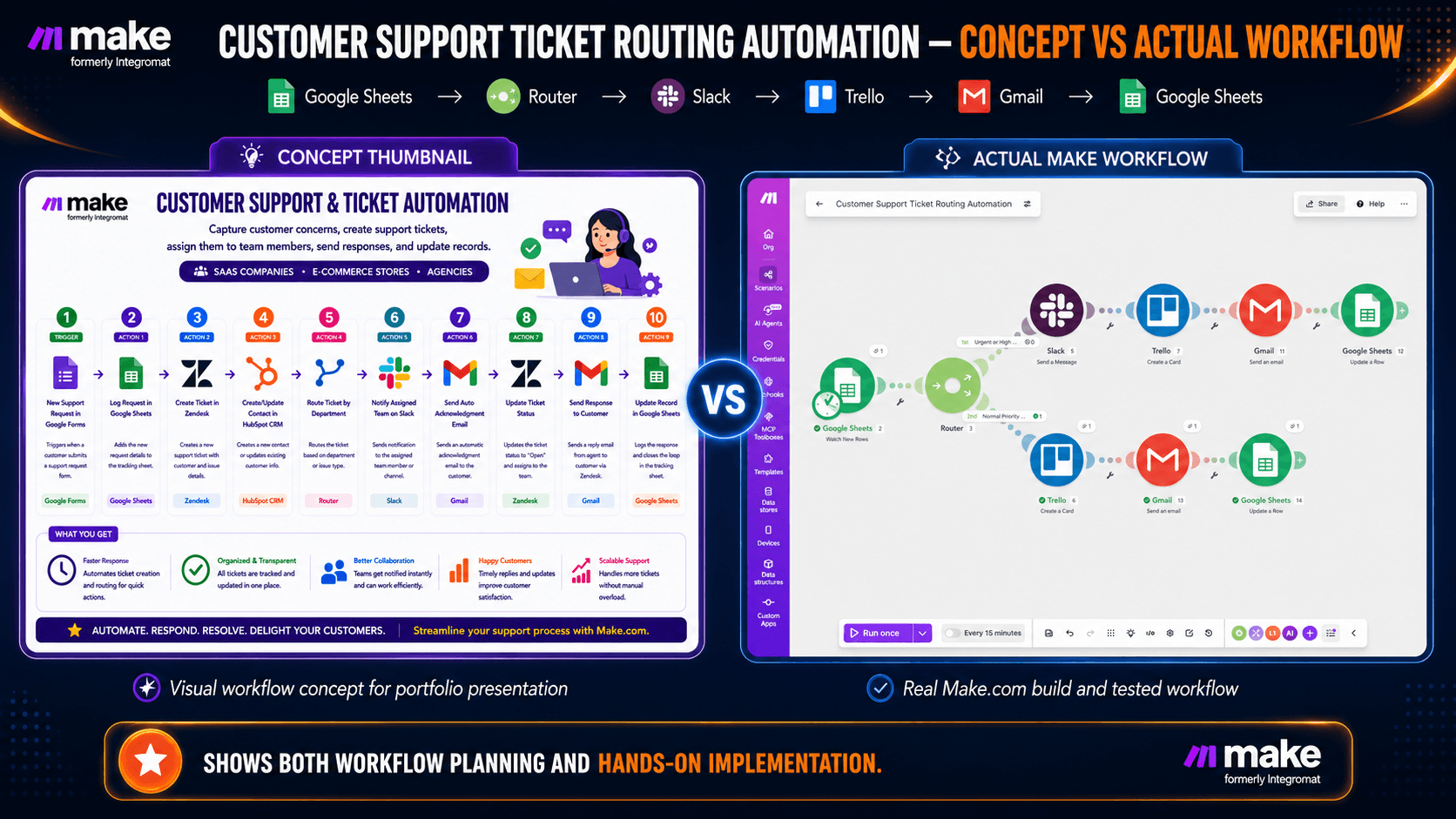
Customer Support Ticket Routing Automation workflow built in Make.com
Approved Upwork Project Catalog Service

Customer Support Ticket Routing Automation

Priority-based ticket routing workflow using Make, Google Sheets, Slack, Trello, and Gmail to organize customer requests and reduce repetitive support work.

Starting at $25
MakeGoogle SheetsSlackTrelloGmail
View Service on Upwork
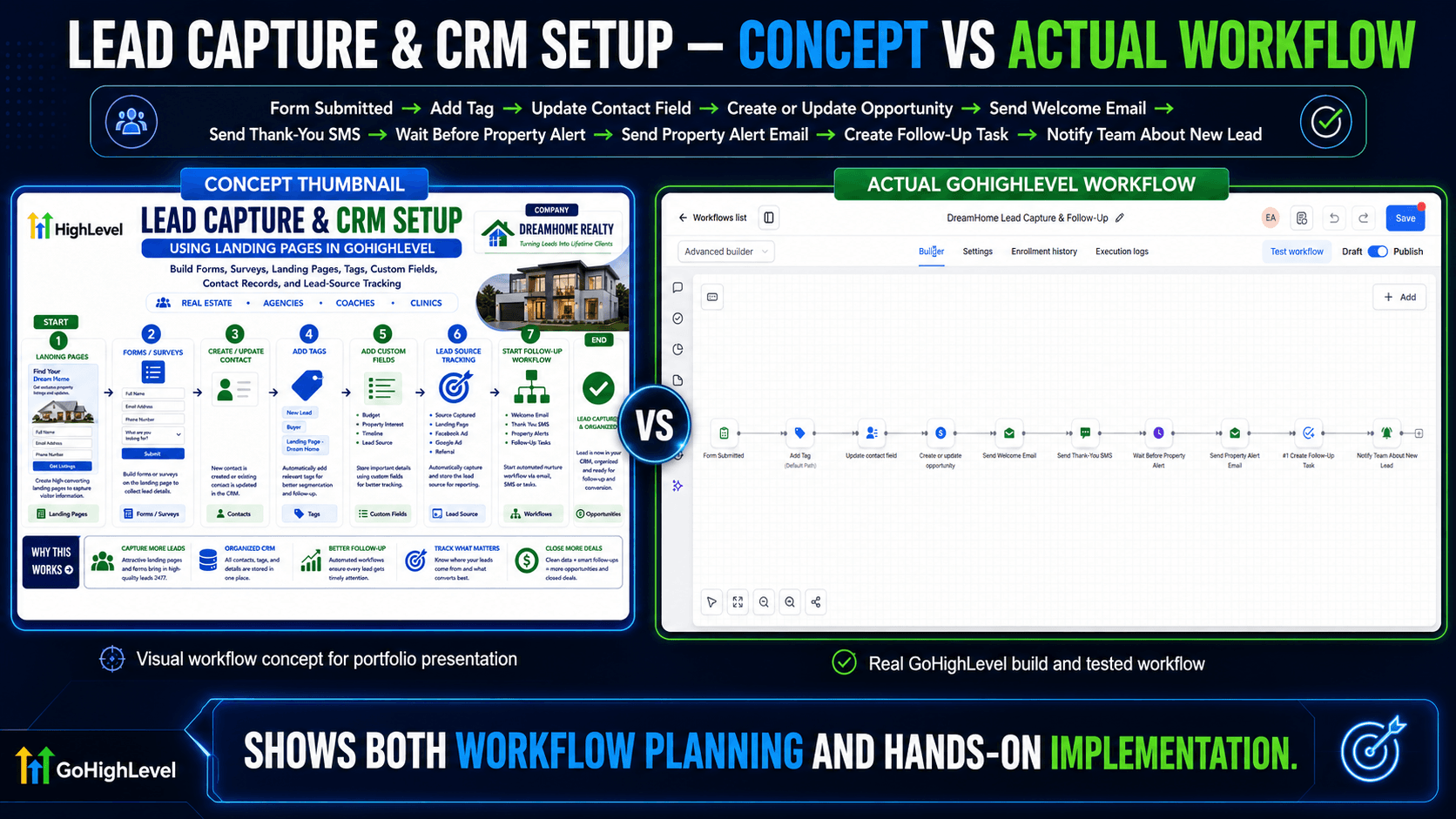
Lead Capture and CRM Setup workflow built and tested in GoHighLevel
Approved Upwork Project Catalog ServiceGoHighLevel

CRM Lead Capture Workflow Setup

Lead capture and CRM workflow setup in GoHighLevel that organizes new contacts, tracks lead information, and starts automated follow-up.

Starting at $25
GoHighLevelLead CaptureCRMForms & Landing PagesAutomated Follow-Up
View Service on Upwork
Appointment Reminder Workflow built in GoHighLevel
Approved Upwork Project Catalog Service

Appointment Reminder Workflow — GoHighLevel

Automated appointment reminder workflow in GoHighLevel that sends confirmation and reminder messages to help reduce no-shows and keep clients informed.

Starting at $25
GoHighLevelAppointmentsEmailStaff NotificationCalendar
View Service on Upwork
Review Request Automation concept versus actual GoHighLevel workflow
Approved Upwork Project Catalog ServiceGoHighLevel

Review Request Workflow Automation

Automatically sends review requests after a completed service, records the request, and notifies the team.

Starting at $25
GoHighLevelReview RequestGoogle SheetsTeam Notification
View Project on Upwork
Missed Call Text-Back Automation concept versus actual GoHighLevel workflow
Approved Upwork Project Catalog ServiceGoHighLevel

Missed Call Text-Back Automation

Automatically responds to missed callers by text so businesses can reconnect with potential customers faster.

Starting at $25

GoHighLevelMissed CallSMS ReplyLead Recovery
View Project on Upwork
LIVE & PUBLISHEDMANYCHAT AUTOMATIONCLIENT-READY DEMO

ManyChat Facebook Messenger Menu Automation

A ManyChat Facebook Messenger menu automation that helps businesses organize repeated customer inquiries about services, pricing, payment, location, schedules, and next steps through automated replies and interactive menu navigation.

Starting at $20

ManyChatFacebook MessengerMessenger AutomationMenu AutomationCustomer Inquiry AutomationAutomated RepliesKeyword TriggersFAQ AutomationTechnical VAWorkflow Automation
View Service on Upwork

Project Library

More Projects

Explore workflow concepts and platform-specific project libraries.

Visual Portfolio

Automation Concept Visuals

These sample visuals showcase automation ideas for different business workflows and industries. They are included to demonstrate process thinking, workflow structure, business use-case planning, and visual communication.

These are portfolio concept visuals and workflow examples. They are not presented as paid client projects or guaranteed production systems. Final implementation depends on the client's tools, accounts, data, integrations, and business requirements.

Concept Visual

Lead Capture Automation

Illustrates a possible workflow for capturing leads, organizing contact details, and preparing follow-up steps.

n8nFormsGoogle SheetsCRM

Concept Visual

Appointment Booking Workflow Visual

Shows how booking requests, calendar availability, confirmations, reminders, and team notices may connect.

n8nGoogle CalendarCRMEmail

Concept Visual

Customer Inquiry Auto-Reply Workflow

Demonstrates a possible process for receiving inquiries, organizing details, preparing replies, and routing follow-up.

n8nMessagingCRMEmail

Concept Visual

CRM Contact Management Workflow

Visualizes contact capture, CRM updates, pipeline organization, follow-up tasks, and reporting steps.

n8nCRMGoogle SheetsEmail

Concept Visual

Pipeline and Deal Tracking Workflow

Shows a possible workflow for organizing lead stages, assigning deals, scheduling follow-ups, and tracking status.

n8nCRMPipelineNotifications

Concept Visual

Email Follow-Up Workflow

Illustrates how new leads may enter an email sequence with delays, response checks, and follow-up actions.

n8nEmailCRMFollow-Up

Concept Visual

SMS Reminder Workflow

Demonstrates a reminder process using booking data, scheduled checks, personalized messages, and delivery status.

n8nSMSCalendarCRM

Concept Visual

Google Sheets Automation Workflow

Shows how form data may be validated, added to Google Sheets, followed by notifications and task creation.

n8nGoogle SheetsFormsNotifications

Experience & Skills

Experience & Skills

Hands-on experience in funnel building, CRM setup, workflow automation, testing, troubleshooting, digital systems, and process documentation.

I build and test funnels, CRM systems, and workflow automations, organize digital processes, document workflows, and support lead management, appointment systems, customer onboarding, messaging automation, and online business operations.

My machine-operator background strengthened my attention to detail, consistency, time management, process-following, and reliability.

Training Program

Technical Virtual Assistant Academy

Beginner-friendly Technical VA training offered separately from my client services.

For learning, practice, and skills development only. No guaranteed job, client, salary, or income.
Online TrainingOnline Self-Paced Course

Technical Virtual Assistant Academy

A beginner-friendly online training program that teaches practical Technical VA skills using AI tools, automation platforms, CRM systems, and guided portfolio practice projects.

Price

₱1,499 Introductory Price

Original Value

₱4,699

Course details, tools, and location notes

Features

  • Beginner-friendly lessons
  • Step-by-step learning
  • Practical workflow exercises
  • Real-world application examples
  • Self-paced access
  • Portfolio-building activities

Tools and Modules

  • ChatGPT
  • Zapier
  • Make.com
  • n8n
  • GoHighLevel
  • Systeme.io
  • Shopify basics
  • Workflow planning
  • CRM setup
  • Portfolio practice projects

For learning and practice only. No guaranteed job, clients, salary, or income.

Message to Enroll

Opens Messenger. Send the keyword ENROLL. Facebook or Messenger login may be required.

Davao City OnlyPrivate Face-to-Face Training

1-on-1 Face-to-Face Technical VA Training

A private 1-on-1 Technical VA training program for beginners who prefer guided face-to-face instruction, practical exercises, questions, testing, and troubleshooting support in Davao City.

Price

₱3,499 Introductory Price

Regular Value

₱6,999

Course details, tools, and location notes

Training Package

  • 5 sessions
  • 4 hours per session
  • 20 total guided training hours
  • Sessions scheduled with breaks between training days
  • Bring your own laptop and charger
  • Payment upon confirmed meetup and schedule

Tools and Modules

  • ChatGPT
  • Zapier
  • Make.com
  • n8n
  • GoHighLevel
  • Systeme.io course access
  • Shopify self-paced bonus lesson
  • Portfolio practice projects
  • Workflow troubleshooting
  • Guided implementation

Location Options

CaféMallLibraryCoworking spacePrivate residence, when appropriate and agreed upon

For learning, practice, and skills development only. No guaranteed job, clients, salary, or income.

Message for Davao Training

Opens Messenger. Send the keyword DAVAO TRAINING. Facebook or Messenger login may be required.

Skills Strengthened Through Course Building
Course DevelopmentTechnical TrainingWorkflow AutomationCRM SetupTechnical DocumentationLesson PlanningPortfolio DevelopmentStudent GuidanceTroubleshootingVisual Content CreationAI ToolsAutomation Platforms

Available for remote support opportunities

Let's Work Together

I'm available for fixed-price projects and part-time support involving funnels, CRM systems, workflow automation, messaging automation, and digital operations.

fVisit AI Income Builder

Facebook login may be required to view the Page.

View LinkedInView YouTube ChannelDownload Resume

Your message will be sent directly to abuleedward03@gmail.com.